FUTMARKET.APP / Four free core tools
Free FC 27 Squad Builder for the Web App
Try a formation or replacement without changing your active EA squad. Squad Builder lets you inspect positions and chemistry using your club, then save a local draft for later comparison.
Install ↗Read the guide ↗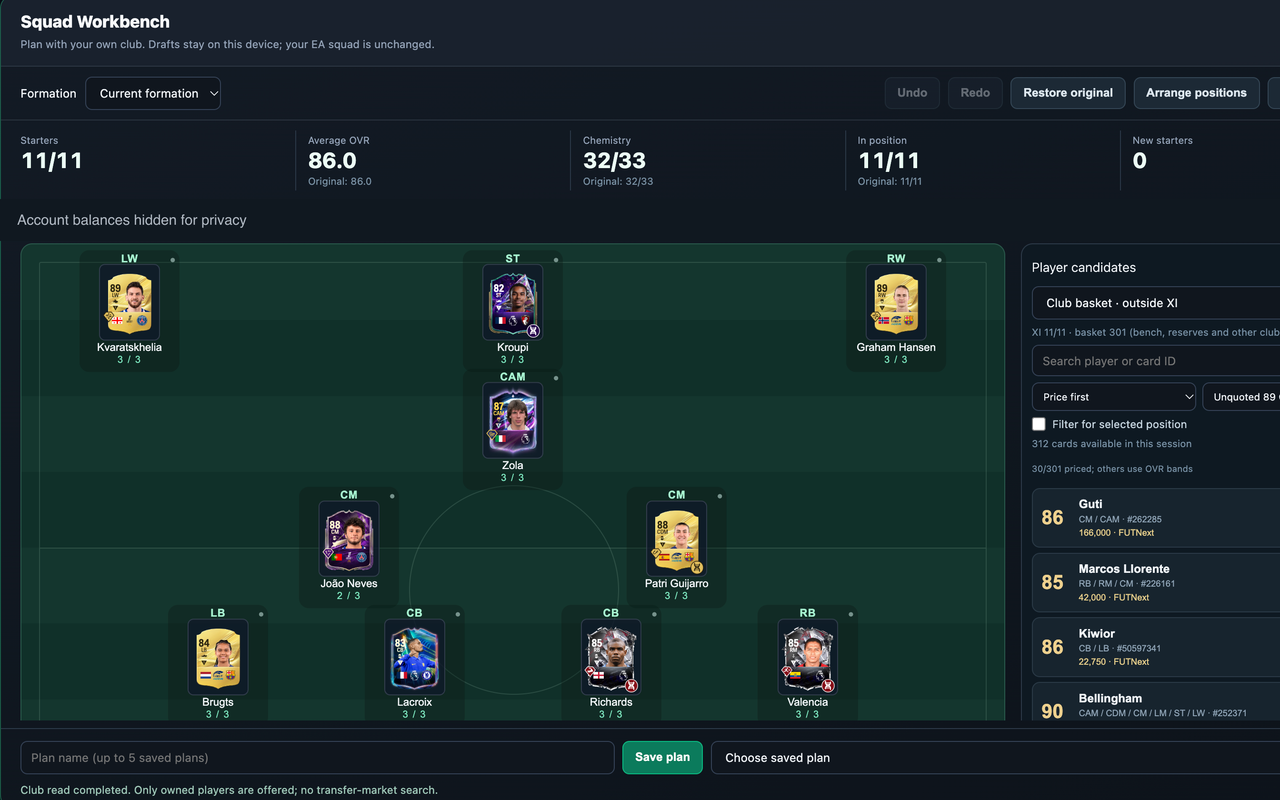
A worked example
The capture shows 11/11 starters, 86.0 average OVR and 32/33 chemistry. João Neves has 2/3 chemistry while most visible players have 3/3. This identifies a place to investigate; it does not prove a replacement will improve the whole team.
How to start
- Go to Squads, open an active squad and launch Squad Workbench. The workbench starts from your club/squad context; editing its local draft does not apply changes to the active EA squad.
- Choose a formation, select a position and compare candidate players. Inspect rating, chemistry, position fit and quoted cost together. Pin positions you want to preserve before using automatic position arrangement or chemistry tools.
- Use Undo / Redo to compare changes; up to 30 steps are kept in the current workbench session. Save a named plan to retain it locally; up to five drafts are stored for the current account, season and platform.
- Budget numbers are estimates. Concept players represent planned purchases, not owned cards, and unquoted candidates make the cost incomplete. Reload a saved plan only after checking the account and season.
Free scope and limits
The current public FUTMarket extension is free, including these core tools and the other available club tools. EA Web App access is required. Card purchases and SBC submissions can spend game coins or items.
Budget numbers are estimates. Concept players represent planned purchases, not owned cards, and unquoted candidates make the cost incomplete. Reload a saved plan only after checking the account and season.
Sources and privacy ↗