FUTMARKET.APP / FC27
FC27 everyday guide: card prices, locks, 24h trends and display settings
Small card icons, top-bar notices and settings beyond the four main tools.
Real English interface crops. Small images; click to enlarge.
Read card prices and labels
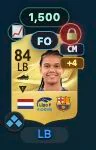
- The number above a card is its exact-version reference price. Hover for source, platform and time. It is not your purchase cost or a guaranteed current listing.
- 🪙 shows a recorded purchase cost. FO means first owner, not necessarily untradeable. CM, LM and other tags are playable positions; +N means more, with the full list on hover.
Lock players you want to keep
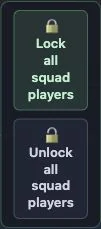
- Click 🔓 to make it 🔒; click again to unlock. The plugin skips locked players in automatic SBC planning and protected bulk listing. Check EA’s manual actions yourself.
- Normal squads have lock/unlock-all buttons, including bench and reserves. Control Center → Locked Players lists entries and lets you unlock them individually.
- Check SBC & Squad Tools → Locked cards include SBC storage. When off, matching storage copies remain usable; club/unassigned copies stay protected. A separately locked storage item is still protected.

Click 📈 for today/24h prices
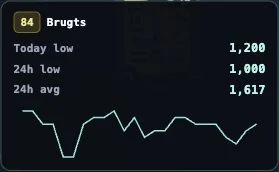
- Open 📈 beside a card for today’s low, 24h low, 24h average and a small trend line. These are historical statistics, not the current lowest listing.
- Trend data loads on click, without continual polling for every card. No trend data means unavailable data, not a zero price; try later.
Read top-bar usage and version status
- SBC and transfer search show locally recorded counts and reference limits for the last hour/24h. Today uses a rolling 24h window. These are not official EA remaining quotas or a safety guarantee.
- The badge shows installed version and update status. For an update, open Control Center and install the new package. Unknown/failed checks do not mean up to date; use Check for updates again.

Adjust a crowded display
- Click futmarket.app → Prices & Display. Language follows EA by default or can be selected manually. Adjust full width, compact lists and grid view.
- Disable automatic reference prices if unnecessary. A 95% bargain threshold highlights at least 5% below reference; it does not confirm a purchase. Settings stay in this browser.

Clear up common questions
- Old means an older cached quote; No quote means missing data, not a worthless card. Check version and platform, then verify on the market.
- Missing from an SBC plan? Check locks, active-squad protection, special/Evolution exclusions, tradeable policy, inventory sources and storage-lock scope.
- Missing icons? Keep one plugin channel enabled and reopen EA. After changing browsers or clearing local data, recheck settings, locks and records.