FUTMARKET.APP / FC27
FC27 How to use the SBC workbench: four simple walkthroughs
Open your challenge, find its type below, and follow the steps.
Everyday tools & quick help ↗ · FC27 Smart Trader guide: one-click BIN, bulk fodder and BID ↗
Which SBC are you doing?
Real English interface. Click any screenshot to enlarge it. The plugin follows your selected language.
How is CPP calculated?
CPP means Coins per Point: a player’s coin price divided by the SBC points that card provides.
1,000 ÷ 830 ≈ 1.20coins per point
Compare fodder at different ratings: a lower CPP buys the same points for fewer coins. Use low-CPP cards to reach the target, then compare the total coin cost of the complete plans.
Repeatable points SBC
- Open the challenge and click SBC Workbench. It reads the remaining points automatically.
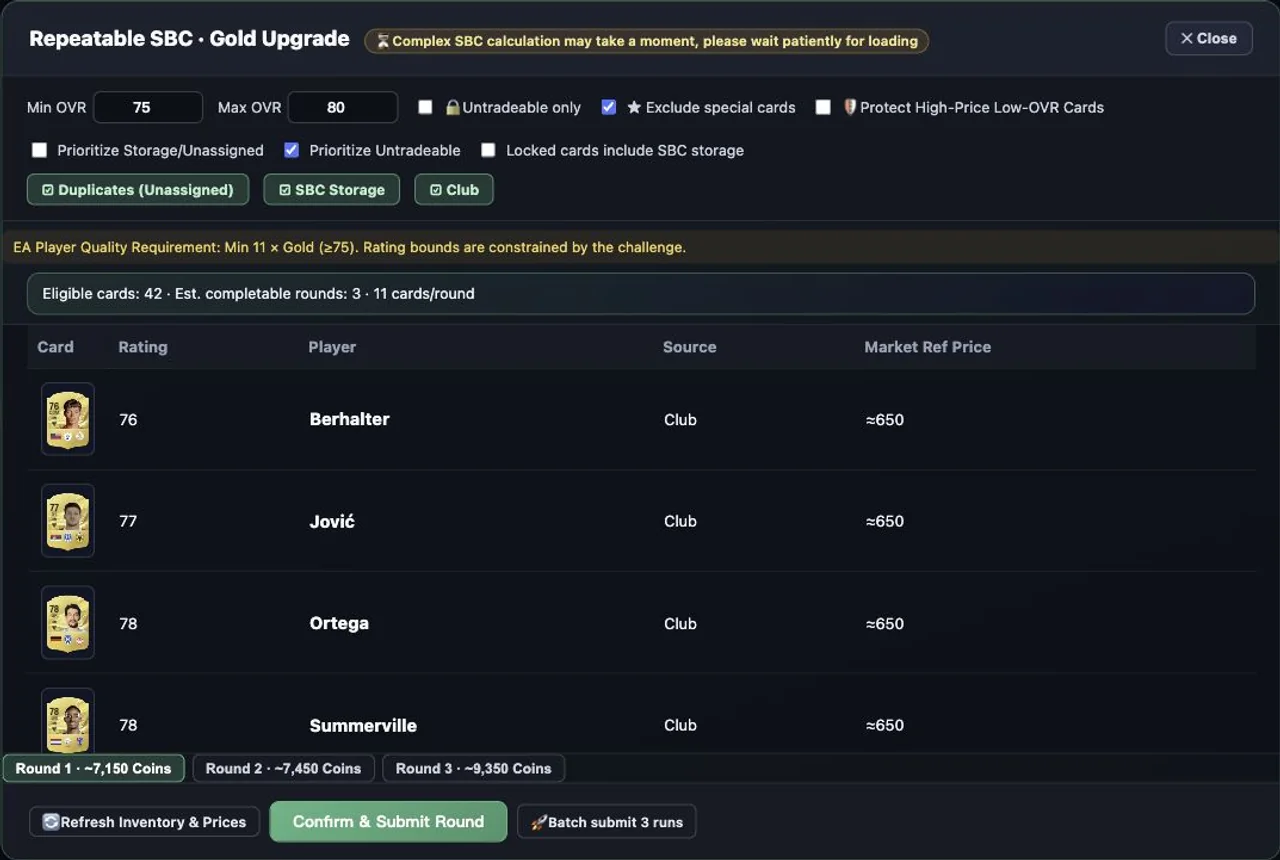
- Set Card Price Range and Rating range. Choose Club, SBC Storage or Duplicates as your player sources.
- To keep tradeable players, enable Untradeable only. For a preference instead, choose Prioritize Untradeable or storage priority. Lock players you want to keep and check whether locks include storage.
- The workbench generates plans. Compare Lowest Cost, Fewest Cards and Zero Overshoot, and check how many rounds your inventory can form.
- Do not want to submit a player? Click the − beside that card to get a new combination. For one round, click Confirm & Submit Round and review the players again.
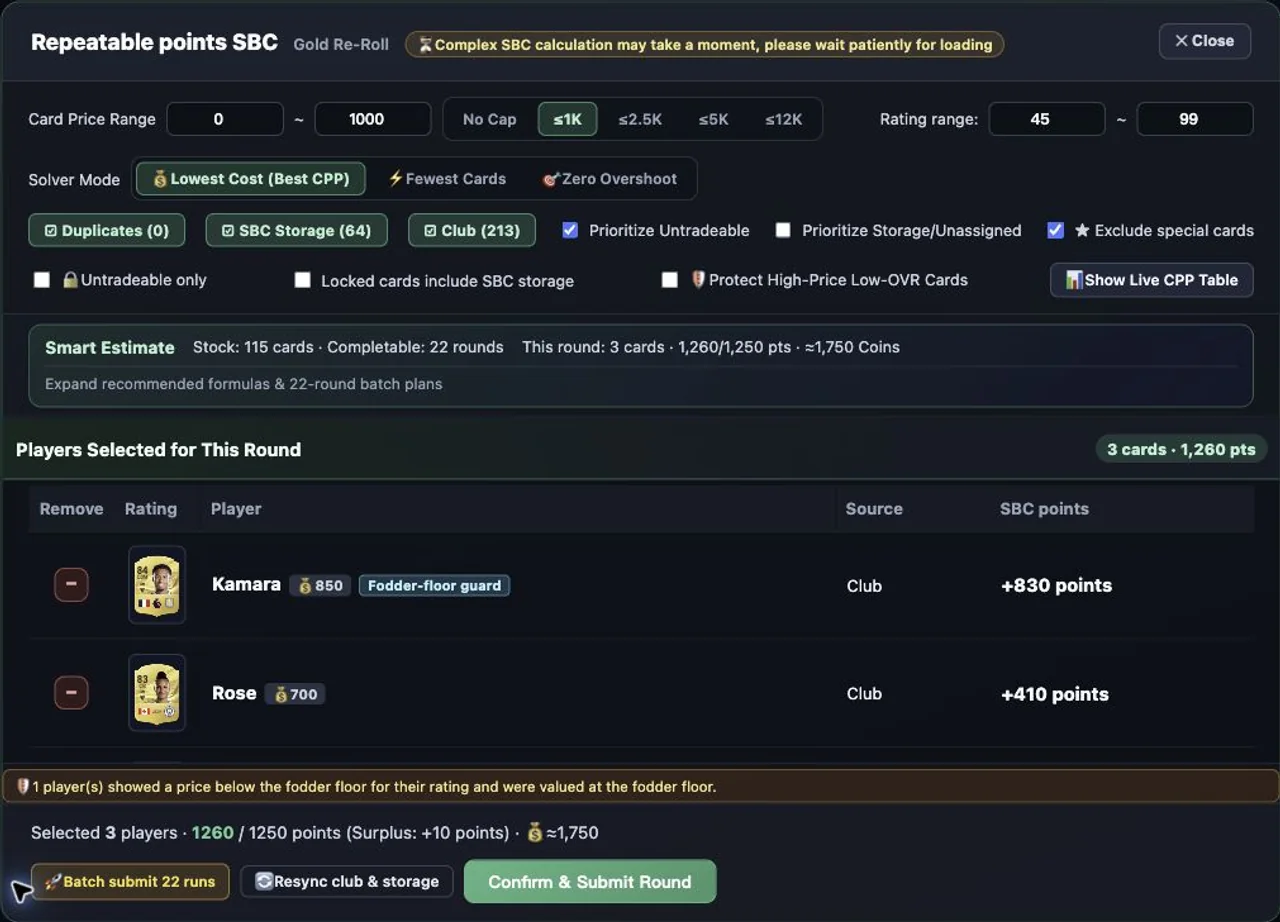
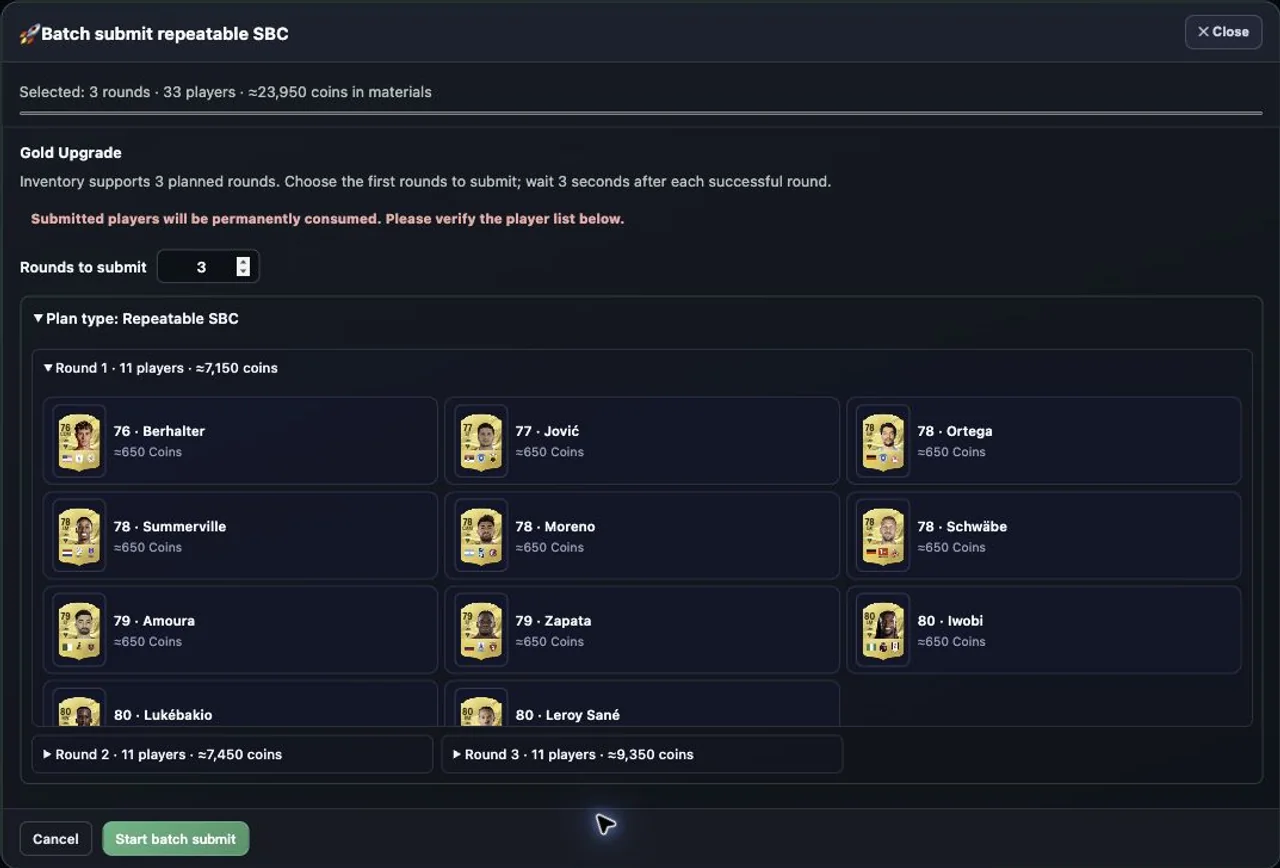
Doing several rounds? Open batch submit
- Click Batch submit at the bottom of the workbench. Enter how many rounds you want: enter 3 to complete three rounds.
- Expand Plan type and the round lists to review the players. When ready, click Start batch submit.
- Watch the progress at the top. After each successful round, the tool rests for 3 seconds. Click Stop batch to stop the following rounds.
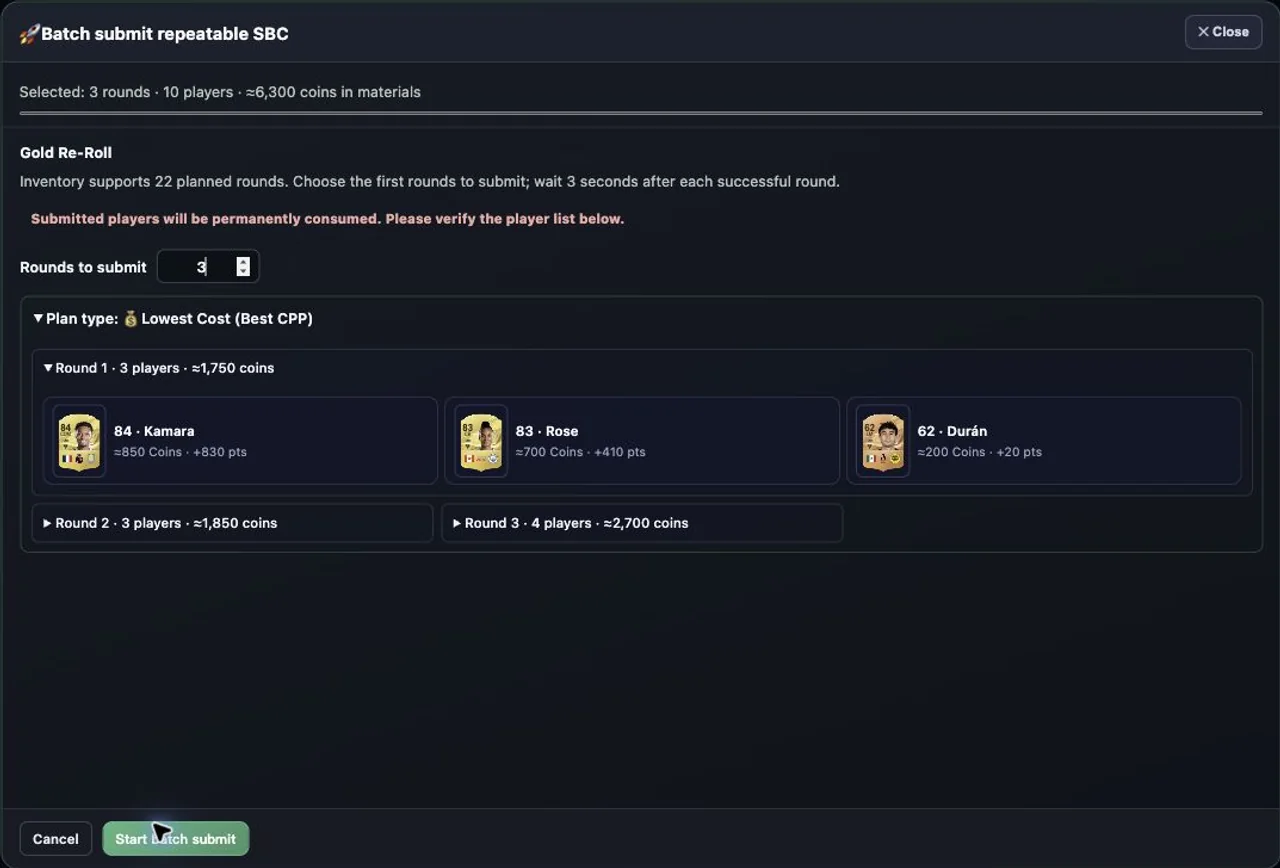
One-time points SBC
- Open the challenge and click SBC Workbench. Set the card price and rating ranges, then choose your inventory sources.
- Compare the three plan types. Click − beside any player you want to keep.
- Not enough stock? Expand the recipes and plans area. The points shortfall section shows the target, the available points and the missing points.
- Look at Cheapest top-up: it suggests which ratings to buy, how many of each, and an estimated cost. Compare the fewest-card option and the suggestions for individual ratings too.
- After buying the materials, click Resync club & storage to generate a fresh plan. Review the players, then click Confirm & Submit Round. This challenge has one round.
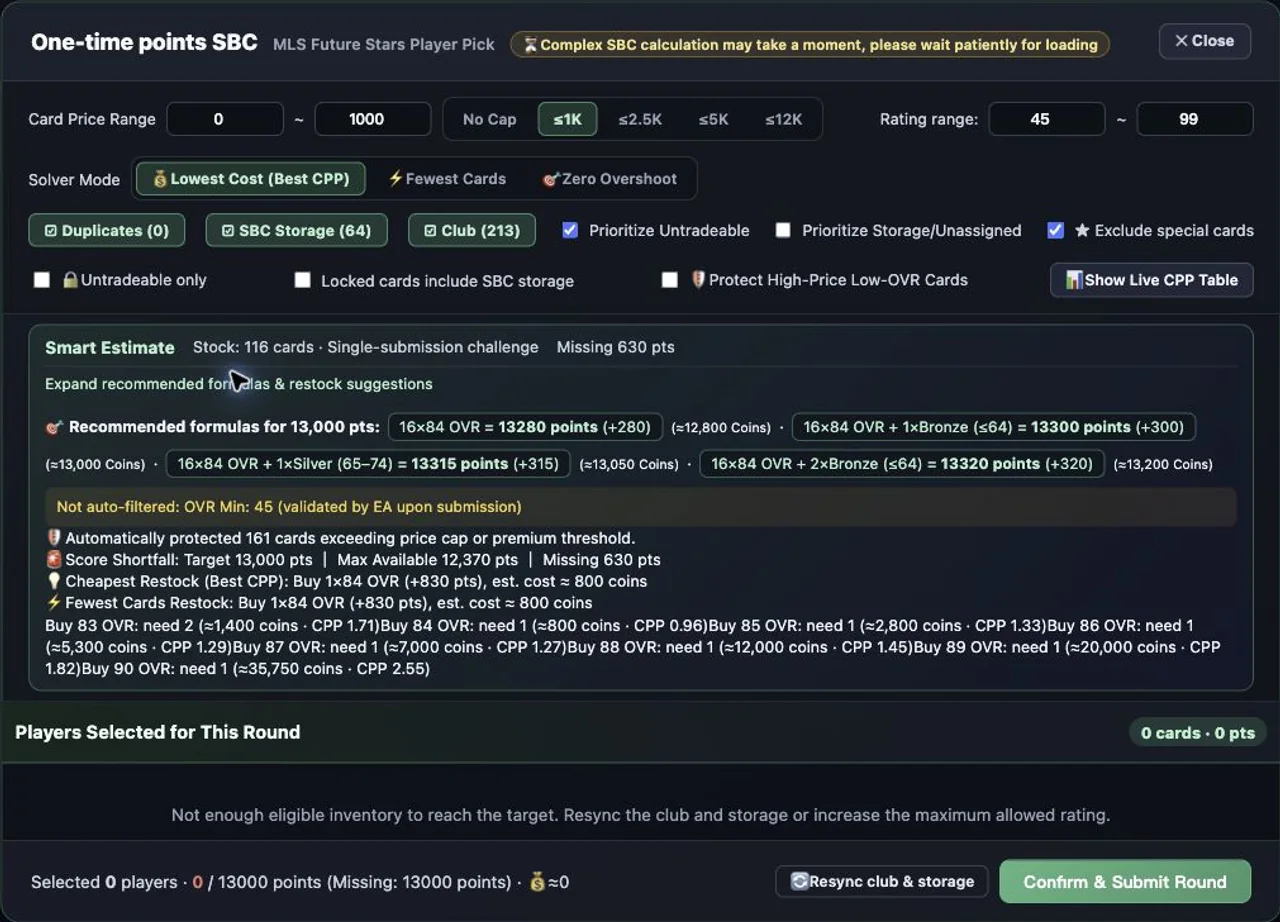
Challenge SBC: rating, chemistry and other requirements
- Open the individual challenge and click SBC Workbench. Expand Challenge Requirements to see what you need.
- Choose your inventory and protection settings. Compare Inventory First, Low-price Buy First and Club Inventory Only where available.
- Choose a plan and one of its alternatives. Check that all requirements are met, then review players, positions, chemistry and cost. Use Swap Out for a player you want to keep.
- If the plan includes cards to buy, click Auto-Buy Missing Cards. Review the exact cards and buying limits in the purchase window. If you cannot buy them all, return and choose another plan.
- Refresh inventory after buying, check the requirements and player list again, then click Confirm & Submit Round. The confirmation window lets you review the players once more.
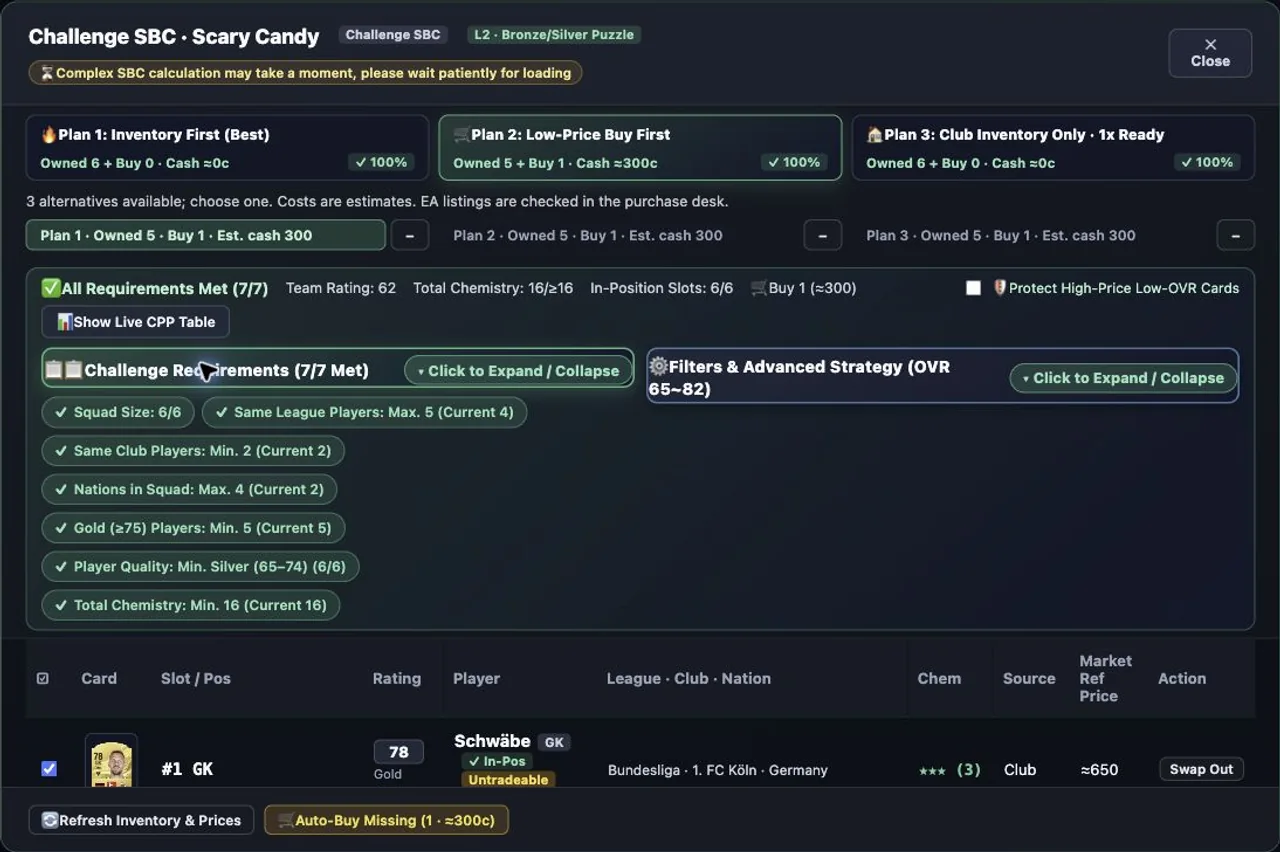
Repeatable SBC without points
- Open a challenge marked Repeatable and click SBC Workbench. This type uses squad requirements rather than a points bar.
- Choose your inventory sources, rating range, untradeable settings and locks. The workbench shows how many rounds it has planned.
- Switch between Round 1, Round 2 and so on to see the players. Lock or exclude any card you want to keep, then generate a fresh plan.
- For one round, click Confirm & Submit Round. For several, click Batch submit, choose the round count and expand the player lists.
- Start when ready. Progress stays at the top, with a 3-second rest after each successful round. Stop batch prevents the following rounds.
Words used in this guide
- Fodder: cards mainly valued as SBC materials. A high rating alone does not make a card eligible.
- CPP means Coins per Point: a player’s coin price divided by the SBC points that card provides. 1,000 ÷ 830 ≈ 1.20 coins per point.
Complex SBC solver
The current public FUTMarket extension is free, including these core tools and the other available club tools. EA Web App access is required. Card purchases and SBC submissions can spend game coins or items.
Free FC 27 SBC Solver for the Web App ↗